
Quick Answer: Zoom vs Webex at a Glance
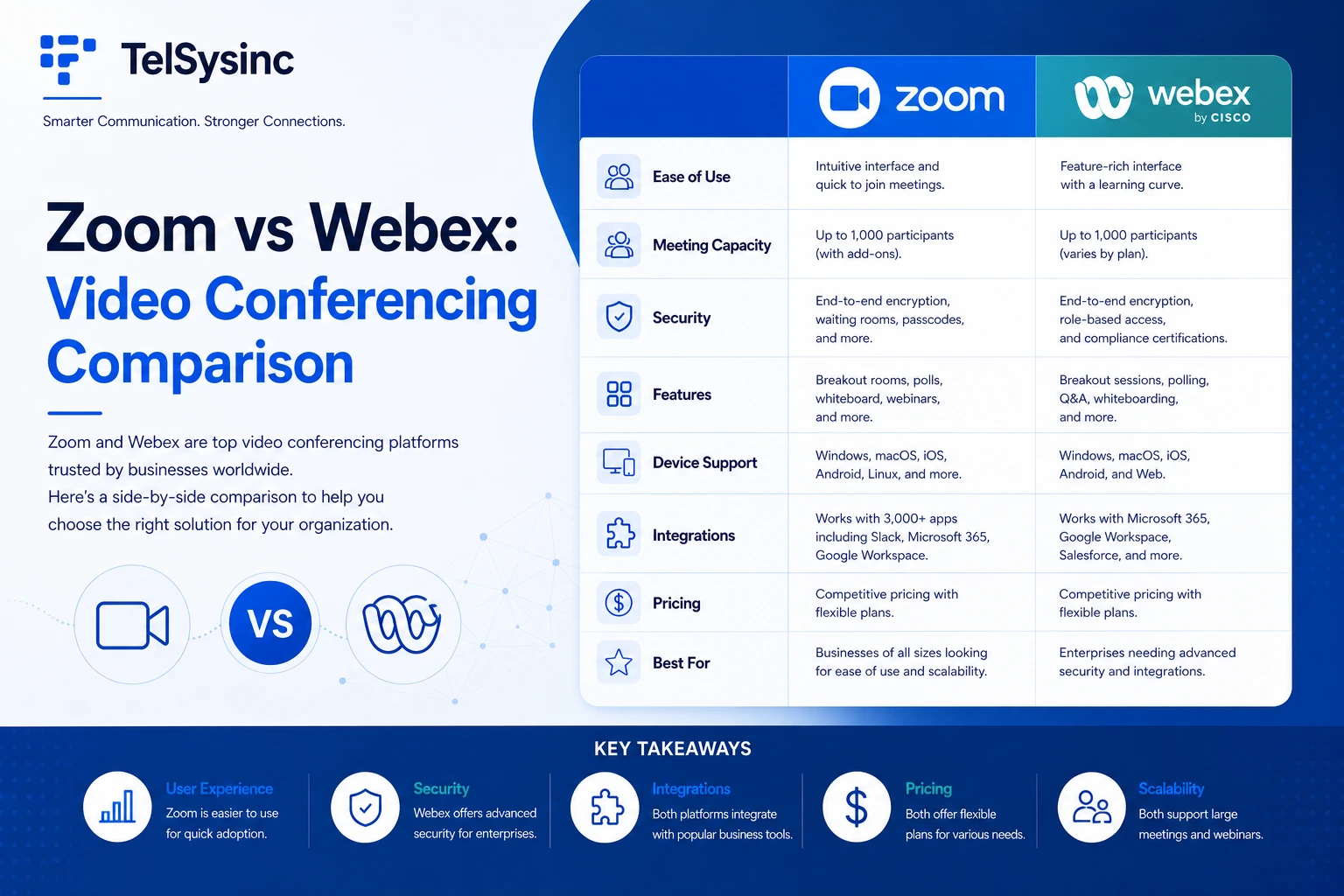
Zoom is the better choice for most small-to-mid-sized teams that prioritize ease of use, quick onboarding, and a wide app ecosystem. Cisco Webex is the stronger pick for enterprise organizations in regulated industries — healthcare, government, finance — where security compliance, Cisco hardware integration, and granular admin controls matter most.
Still not sure? Read on. This guide breaks down every major difference — from whiteboard tools and AI features to pricing and real-world usability.
What Are Zoom and Cisco Webex?
These two platforms have dominated the video conferencing market for years, but they come from very different places.
Zoom launched in 2013 with a single goal: make video meetings fast, simple, and reliable for anyone. It exploded during the pandemic, becoming essentially synonymous with "video call" for millions of users worldwide. Today, Zoom has evolved into a full collaboration suite — meetings, chat, phone (Zoom Phone), webinars, and its own visual collaboration tool, Zoom Whiteboard.
Cisco Webex has a longer history, originally founded as an independent company in 1995 before Cisco acquired it in 2007. Webex was purpose-built for enterprise communication and has quietly powered meetings at major corporations, government agencies, and even NASA for decades. While Zoom was winning the consumer and SMB market, Webex was entrenched in the enterprise.
Understanding this background matters because it explains nearly every difference in how these platforms approach design, pricing, and security.
Zoom vs Webex: Feature-by-Feature Comparison
Video and Audio Quality
Both platforms support HD video and high-quality audio under normal network conditions, and both have made significant investments in noise suppression and AI-driven audio clarity.
Webex has long been praised for consistent audio quality — especially useful in environments with variable connectivity. Zoom delivers crisp video too, though users on constrained bandwidth have occasionally reported more noticeable degradation.
Both tools now include AI-powered audio enhancement:
- Zoom: AI Companion handles noise suppression, smart backgrounds, and real-time transcription
- Webex: Webex Assistant offers similar features, plus real-time translation into 100+ languages — a major differentiator for global teams
- Winner: Tie for most teams. Webex edges ahead for global, multilingual meetings.
Webex's mid-tier plans accommodate larger groups at a lower per-user price. Zoom's Business plan costs more but includes a higher participant cap. For top-tier enterprise plans, both can host up to 1,000 people — and Webex's large-event tiers can go even beyond that with unlimited dial-in options.
Practical takeaway: If your team regularly runs large all-hands meetings or webinars on a mid-range budget, Webex offers better value per seat. If you need scale and are willing to pay for it, Zoom's higher tiers are competitive.
Zoom Whiteboard vs Webex Whiteboard
This is a key differentiator that deserves its own section — and it's where Zoom has made significant investments.
What Is Zoom Whiteboard?
Zoom Whiteboard is a built-in digital canvas that gives teams a persistent, expandable space to brainstorm, diagram, and co-create — both during meetings and asynchronously between sessions. It's not just an annotation layer on top of screen sharing; it's a full visual collaboration environment.
Key Zoom Whiteboard features include:
- Infinite canvas with sticky notes, shapes, freehand drawing, and connectors
- 250+ pre-built templates (mind maps, Kanban boards, project plans, flowcharts)
- Drag-and-drop PDF annotation during live meetings
- AI-powered board generation from meeting conversation context
- Emoji, stamps, stickers, and interactive action buttons
- Video embedding and Kanban boards for advanced workflows
- Custom color picker with HEX value support for brand consistency
- Available on desktop, mobile, and Zoom Rooms hardware
One standout detail: Zoom's AI Companion can generate a collaboration-ready whiteboard from whatever's been discussed in a meeting — sticky notes, organized areas, and all — without you stopping to format anything. That's a genuinely useful feature for fast-moving brainstorming sessions.
The free Zoom Whiteboard (Basic plan) gives you core tools, but persistent boards and advanced collaboration features require a paid plan (Zoom Pro or above). Free users are capped at three boards total.
What Is Webex Whiteboard?
Webex Whiteboard is included on all Webex plans — including the free tier — which is a meaningful advantage. Webex whiteboards persist after the meeting ends and can be shared with participants who weren't in the original session. For regulated industries, Webex whiteboards operate on the same DISA-certified, FedRAMP-authorized infrastructure as the rest of the platform.
Feature highlights:
- Unlimited whiteboarding on the free plan
- Freehand drawing, shape recognition, sticky notes, and multi-user annotation
- Persistent boards accessible post-meeting
- Sharing with non-meeting participants
- Integration with Webex's broader collaboration suite
If your team relies heavily on visual collaboration and you're on a free or entry-level plan, Webex's whiteboard is more accessible. If you need advanced AI-powered brainstorming, rich templates, and deep meeting integration, Zoom Whiteboard wins on features.
Collaboration Tools Beyond Whiteboards
Both platforms tick the essential boxes: screen sharing, in-meeting chat, polling, annotation, and breakout rooms. A few differences worth noting:
- Zoom integrates with Slido for advanced polling/Q&A and has a significantly larger app marketplace — roughly twice the number of integrations as Webex's app hub
- Webex offers workspace reservation (useful for hybrid office management) and native Slido integration at higher tiers
- Zoom's Clips feature lets you record and share async video messages without scheduling a meeting — handy for distributed teams across time zones
AI Features: Zoom AI Companion vs Webex AI Assistant
AI is now a genuine competitive battleground between these two platforms.
Zoom AI Companion is included in all paid plans and handles:
- Real-time meeting transcription and smart summaries
- Action item detection and follow-up suggestions
- Auto-generated whiteboard content from meeting discussions
- Chat compose and email drafting assistance
Webex AI Assistant is available on mid-to-higher tiers and offers:
- Real-time transcription and post-meeting summaries
- Live translation in 100+ languages
- People-focused speaker tracking in video
- Background noise removal and voice enhancement
Real-time translation is a feature Zoom currently reserves for higher enterprise tiers, while Webex offers it more broadly — a significant advantage for internationally dispersed teams.
Security and Compliance
Security is one of Webex's strongest selling points, and for regulated industries, it's often the deciding factor.
Zoom:
- AES-256 encryption for media
- Optional end-to-end encryption (E2EE) available
- Waiting rooms, meeting passwords, and participant controls
- HIPAA-compliant plans available
- Named a Gartner Magic Quadrant Leader for UCaaS in 2024
Webex:
- TLS 1.2+ for signaling; AES-256-GCM for media by default
- "Zero Trust" E2EE mode — even Cisco's own servers cannot decrypt meeting content
- FedRAMP authorized and DISA STIG certified
- HIPAA, FISMA, and government-grade compliance built-in
- All whiteboard and collaboration data on the same certified infrastructure
For most businesses, both platforms provide more than adequate security. But if your organization operates under HIPAA, FISMA, or government contracts, Webex's compliance infrastructure is purpose-built for your needs in a way Zoom's is not — at least not without specific enterprise configuration.
Integrations and Ecosystem
Zoom's app marketplace is one of its biggest advantages. Native integrations with Microsoft 365, Google Workspace, Salesforce, Slack, HubSpot, and hundreds of other tools are all built-in or just a click away. Zoom also bundles Zoom Phone (enterprise VoIP) and Zoom Rooms (conference room hardware) into its broader platform.
Webex integrates tightly with the Cisco ecosystem — Meraki networking, Cisco IP phones, and Cisco Room hardware work seamlessly together. If your organization already runs Cisco infrastructure, Webex plugs in without friction. For non-Cisco environments, Webex supports major business tools but has a smaller third-party marketplace.
Rule of thumb: Microsoft/Google-first organizations tend to find Zoom more natural. Cisco-infrastructure organizations lean toward Webex.
Pricing Plans Comparison:
Both Zoom and Webex have free and paid tiers. Webex’s Free plan is $0 and allows up to 100 participants per meeting for 40 minutes. Zoom’s Basic (free) plan likewise hosts up to 100 users for 40 minutes.
Paid plans differ:
Cost summary: Webex's entry paid plan is slightly cheaper. Zoom's paid plans include Zoom AI Companion across all tiers, whereas Webex's AI features are gated to higher plans. For five-year total cost of ownership, a Metrigy study commissioned by Zoom found Zoom's TCO runs approximately $1,669 per user versus ~$2,276 for Webex — though exact figures depend heavily on plan selection and add-ons.
Usability: Which Platform Is Easier to Use?
This one isn't particularly close. Most hands-on comparisons — including testing by G2 and Zapier — consistently find that Zoom has a shorter learning curve, particularly for non-technical users.
Zoom's interface is clean and requires minimal setup. Joining a meeting doesn't even require an account for participants. The desktop app is intuitive, and its meeting controls are clearly labeled and easy to find.
Webex is more configurable and offers more granular controls — which enterprise IT teams love — but that complexity can be overwhelming for first-time users. That said, Webex has streamlined its interface significantly in recent updates, closing some of the usability gap.
For non-technical audiences or mixed-skill teams: Zoom is the stronger default. For IT-managed enterprise deployments: Webex's added control is often worth the steeper onboarding.
Who Should Use Zoom?
Zoom is the right choice if you:
- Run a small-to-mid-sized team that values simplicity and fast setup
- Use tools like Google Workspace, Slack, or Salesforce and want seamless integration
- Need a powerful free whiteboard tool for visual collaboration (with AI-generated boards)
- Host webinars or virtual events with mixed external audiences
- Want AI meeting summaries and transcription included in your base paid plan
- Don't have Cisco hardware or infrastructure already in place
Who Should Use Cisco Webex?
Webex is the right choice if you:
- Work in healthcare, government, finance, or any regulated industry requiring FedRAMP or HIPAA compliance
- Already operate within a Cisco infrastructure ecosystem (Meraki, Cisco phones, Cisco Room hardware)
- Run large-scale enterprise deployments requiring granular IT admin controls
- Need real-time language translation for international or multilingual teams
- Want unlimited whiteboarding on a free plan without locking features behind upgrades
- Require Zero Trust end-to-end encryption where even the vendor can't access your data