
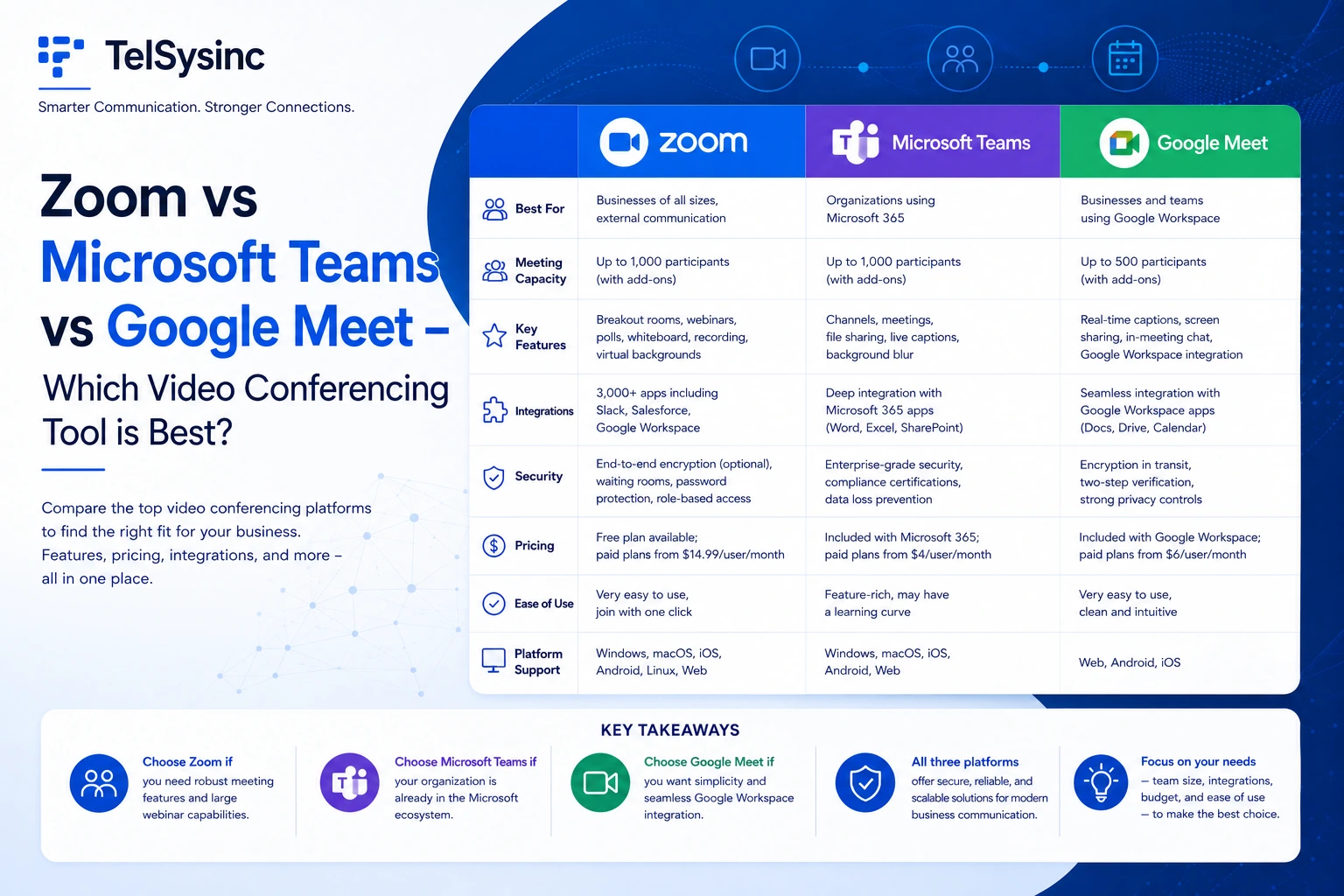
Quick Answer: Which Platform Should You Choose?
- Choose Zoom if you need the best pure video experience, advanced whiteboard tools, and AI features included in your base paid plan — without being locked into a single ecosystem.
- Choose Microsoft Teams if your organization runs on Microsoft 365. The integration with Outlook, SharePoint, Word, and Excel makes Teams the clear choice for document-driven, enterprise collaboration.
- Choose Google Meet if simplicity and cost matter most. If your team already lives in Gmail and Google Calendar, Meet is already there — and it works in a browser without installing anything.
Still working through the decision? Here's everything you need to know.
Why This Comparison Matters in 2025
The video conferencing market is no longer just about joining a call. It's about AI-powered summaries, collaborative whiteboards, async video messaging, and security compliance — all wrapped inside platforms that your team will use every day.
Zoom holds roughly 56% of the market, Microsoft Teams commands around 32%, and Google Meet sits at about 5.5% — but market share alone doesn't tell you which tool fits your workflow. The right answer depends on your tech stack, team size, budget, and how you actually work.
Let's get into it.
Platform Overviews: What Each Tool Is Built For
Zoom
Zoom launched in 2013 with a deceptively simple mission: make video calls work better than anything else on the market. It delivered on that promise, and when remote work exploded in 2020, Zoom became the default verb for video meetings globally.
In 2025, Zoom has evolved well beyond meetings. It now bundles Zoom Chat, Zoom Phone (VoIP), Zoom Rooms (conference hardware), Zoom Whiteboard, and its AI-powered assistant — Zoom AI Companion 3.0 — into a single collaboration suite called Zoom Workplace. Critically, AI Companion is included at no extra cost with all paid Zoom plans.
Microsoft Teams
Teams is what happens when a company with 320 million active users and a suite of productivity apps decides to build a video conferencing tool around those apps instead of the other way around. Meetings, persistent chat, file sharing, SharePoint document libraries, and co-editing in Word, Excel, and PowerPoint all live in one place.
For organizations already on Microsoft 365, Teams is deeply embedded in daily work in a way no other platform can replicate. The tradeoff: it's a heavier, more complex tool, and its AI layer — Microsoft Copilot — costs an additional $30 per user per month on top of your Microsoft 365 subscription.
Google Meet
Google Meet is the quiet professional in this trio. It doesn't try to be everything. Instead, it focuses on being reliable, fast to join, and genuinely affordable — especially for teams already using Google Workspace.
There's no software to install for most users. Click a link in Gmail or Google Calendar and you're in. Google's AI (Gemini) handles meeting summaries and real-time captions automatically for Workspace customers. What Meet lacks in advanced collaboration depth, it makes up for in simplicity and stability — particularly on low-bandwidth connections.
Core Feature Comparison
Video and Audio Quality
All three platforms support HD video and high-quality audio with noise suppression and echo cancellation. That said, there are measurable differences under real-world conditions.
Independent testing has consistently placed Zoom at the top for video fidelity. In bandwidth-constrained environments, Zoom maintained 720p at 25fps and 2.5 Mbit/s — versus Google Meet's 720p at 24fps and just 0.8 Mbit/s. When your connection is stressed, Zoom's image stays sharper.
Microsoft Teams performs well on stable corporate networks and supports 1080p video. Where it can struggle is on weaker connections, partly because its additional collaboration features (live document sharing, screen sharing side panels) can add processing overhead.
Google Meet trades peak quality for consistency. Schools and organizations in bandwidth-limited environments frequently choose Meet specifically because it degrades gracefully rather than dropping calls outright.
- Best video quality: Zoom Best low-bandwidth stability: Google Meet Best for corporate networks: Microsoft Teams
Key Features Comparison:
Collaboration Tools and Whiteboards
This is where the platforms diverge most meaningfully — and where Zoom has invested heavily.
Zoom Whiteboard
Zoom Whiteboard is an infinite digital canvas built directly into the Zoom platform. It's not just a screen share with annotation on top — it's a full visual collaboration environment that persists between meetings and works asynchronously.
What makes it stand out in 2025:
- 250+ pre-built templates (mind maps, Kanban boards, flowcharts, project plans)
- AI-generated boards from live meeting conversations — without stopping to format
- Sticky notes, freehand drawing, shapes, connectors, and PDF annotation
- Video embedding and advanced object types including Kanban cards
- Available on desktop, mobile, and Zoom Rooms hardware
- Free plan: limited to 3 boards; paid plans unlock unlimited persistent boards
Microsoft Whiteboard (in Teams)
Microsoft Whiteboard integrates with Teams and benefits from Loop components — allowing real-time collaborative editing across Word, Excel, and Outlook contexts. For organizations already co-editing documents inside Teams, this integration feels natural. It doesn't match Zoom's template depth or AI board generation, but for document-centric teams, the ability to move fluidly between a whiteboard and a live Word document is a genuine advantage.
Google Meet Collaboration
Google Meet intentionally keeps its in-meeting collaboration lightweight. Polls, Q&A, and emoji reactions are available on paid plans. Breakout rooms require a paid Workspace tier. For actual document collaboration, you're expected to share a Google Doc, Sheet, or Slide in the meeting — which works smoothly, but it's a separate tool rather than a native whiteboard experience.
Whiteboard winner: Zoom — by a meaningful margin on features and AI capabilities. Document collaboration winner: Microsoft Teams — nothing else comes close for real-time Office co-editing.
AI Features: Zoom AI Companion vs Microsoft Copilot vs Google Gemini
AI has become the sharpest competitive battleground between these three platforms, and the cost differences are striking.
Zoom AI Companion 3.0
Included free with all paid Zoom Workplace plans (no add-on required). Key capabilities:
- Real-time meeting transcription with speaker attribution
- Auto-generated smart summaries and action item extraction
- AI-generated whiteboard content from in-meeting discussions
- Agentic task execution — connecting to 16+ enterprise apps including ServiceNow and Asana
- Cross-platform reach: can generate summaries even from Google Meet or Teams meetings
- Daily reflection reports delivered automatically
In independent testing by TestDevLab (commissioned by Zoom), Zoom AI Companion scored 81.35% overall — narrowly ahead of Copilot (80.75%) and Teams Intelligent Recap (78.63%). Its in-meeting response time averaged 4,716ms versus Teams' 9,270ms — nearly twice as fast.
Microsoft Copilot
Deeply woven into the Microsoft 365 suite — Teams, Word, Excel, PowerPoint, Outlook. The April 2025 update added Copilot Memory, autonomous task execution, and Copilot Pages for collaborative AI canvases. For organizations where all work lives inside Microsoft 365, this creates a genuinely connected intelligence layer.
The catch: Copilot costs an additional $30 per user per month on top of your Microsoft 365 subscription. For a 25-person team, that's $9,000/year on top of your existing M365 spend.
Google Gemini in Meet
Gemini handles meeting transcription, auto-summaries, Smart Chips, and integration with Docs, Drive, and Calendar natively. For teams fully on Google Workspace, it integrates without friction. Outside the Google ecosystem, its depth drops significantly, and it trails Zoom AI Companion 3.0 on agentic capabilities.
AI value for the money: Zoom wins clearly. AI Companion is included in your base paid plan. Copilot requires an extra $30/user/month, and Gemini's value depends entirely on your Workspace investment.
Security and Compliance
All three platforms take security seriously. Where they differ is in default configuration and compliance depth.
Microsoft Teams
- Runs on Microsoft Azure infrastructure
- Meets ISO 27001, HIPAA, SOC 2, FedRAMP, and GDPR standards
- End-to-end encryption available via Teams Premium
- Multi-factor authentication through Microsoft Entra ID (formerly Azure AD)
- Sensitivity labels, meeting watermarks, and compliance templates built in
- Widely considered the most security-complete platform for large enterprises
Google Meet
- AES encryption for all streams by default
- Client-side encryption (CSE) available for sensitive meetings on higher-tier plans
- Data residency controls for regulated industries
- Hard-to-guess meeting codes, waiting rooms, and Google account security built in
- Simple interface reduces external attack surface
Zoom
- AES-256 encryption for media; optional end-to-end encryption (E2EE)
- Waiting rooms, meeting passwords, and granular host controls standard
- HIPAA-compliant configurations available
- Gartner Magic Quadrant Leader for UCaaS, 2024
- Zoom addressed early "Zoombombing" vulnerabilities years ago and has maintained strong security posture since
For regulated industries (healthcare, government, finance), Teams' enterprise compliance depth is typically the safest default. For most businesses, all three are more than adequate with proper configuration.
Integrations and Ecosystem Fit
Zoom's app marketplace is platform-agnostic. With 2,000+ third-party integrations spanning CRMs, project management tools, and productivity apps, it slots into almost any tech stack without disruption.
Teams is purpose-built for the Microsoft ecosystem. If your organization runs Windows, Azure AD, Outlook, and SharePoint, Teams integrates those workflows better than any external tool can. For non-Microsoft environments, its integration options are more limited.
Google Meet is the reverse: optimized for Google Workspace, limited outside it. The ability to start a Meet from a Gmail invite or Google Calendar event with zero friction is genuinely useful — but it's a relatively closed ecosystem.
Cost reality check: Google Meet is the most affordable entry point for teams that also need email, docs, and storage — because Workspace Starter bundles all of that together. Teams Essentials is cheapest for pure video conferencing, but most organizations need the broader M365 bundle to get full value. Zoom sits in the middle: slightly more expensive than either free-tier rival, but with AI features already built into the price tag — a meaningful advantage when Copilot costs $30/user/month on top of Teams.
Pros and Cons
Zoom
Strengths: Best-in-class video quality; Zoom AI Companion included at no extra cost; industry-leading Zoom Whiteboard with AI generation and 250+ templates; 2,000+ app integrations; fast, intuitive onboarding for external participants.
Weaknesses: 40-minute free plan cap disrupts longer group meetings; Whiteboard's most useful features require paid plans; not natively embedded in Microsoft or Google productivity workflows.
Microsoft Teams
Strengths: Unmatched Microsoft 365 integration; real-time co-editing in Word, Excel, and PowerPoint during calls; enterprise security and compliance depth; 320 million active users; 60-minute free group meetings.
Weaknesses: Microsoft Copilot costs an additional $30/user/month; steeper learning curve; heavier client app that can slow performance on weak connections; onboarding external participants is less smooth than Zoom.
Google Meet
Strengths: Browser-based with no install required; cheapest full-suite option through Google Workspace; excellent low-bandwidth stability; Gemini AI integrated natively for Workspace users; 60-minute free group meetings.
Weaknesses: Limited native whiteboard or collaboration tools; recording and transcription behind higher-tier plans; breakout rooms restricted to paid plans; AI capabilities depend heavily on your Workspace tier.
Who Should Use Which Platform?
Choose Zoom if you:
- Need the best pure video meeting experience across varied connection speeds
- Want AI-powered meeting summaries, whiteboard generation, and agentic task automation without paying extra
- Use a mix of tools (Slack, Salesforce, HubSpot, Google Drive) and need a platform that connects them all
- Host frequent webinars, external calls, or large-group meetings with participants who may not have accounts
- Run a small-to-mid-sized team that needs quick setup and broad accessibility
Choose Microsoft Teams if you:
- Already run on Microsoft 365 — Outlook, SharePoint, OneDrive, Azure AD
- Need real-time document co-editing during meetings as a core workflow
- Operate in a regulated industry requiring enterprise compliance and sensitivity controls
- Can justify the Copilot add-on cost for AI capabilities across your full Microsoft workflow
- Run a large organization where IT-managed, deeply configured deployments are the norm
Choose Google Meet if you:
- Already use Google Workspace (Gmail, Calendar, Drive, Docs) as your primary productivity suite
- Want the most affordable path to solid video conferencing with AI included
- Prioritize simplicity — no apps to install, link-based joining, and minimal admin overhead
- Serve external participants (clients, students) who need frictionless access with no accounts required
- Operate in bandwidth-limited environments where connection stability matters more than features