
Quick Answer: How Much Does Zoom Cost in 2026?
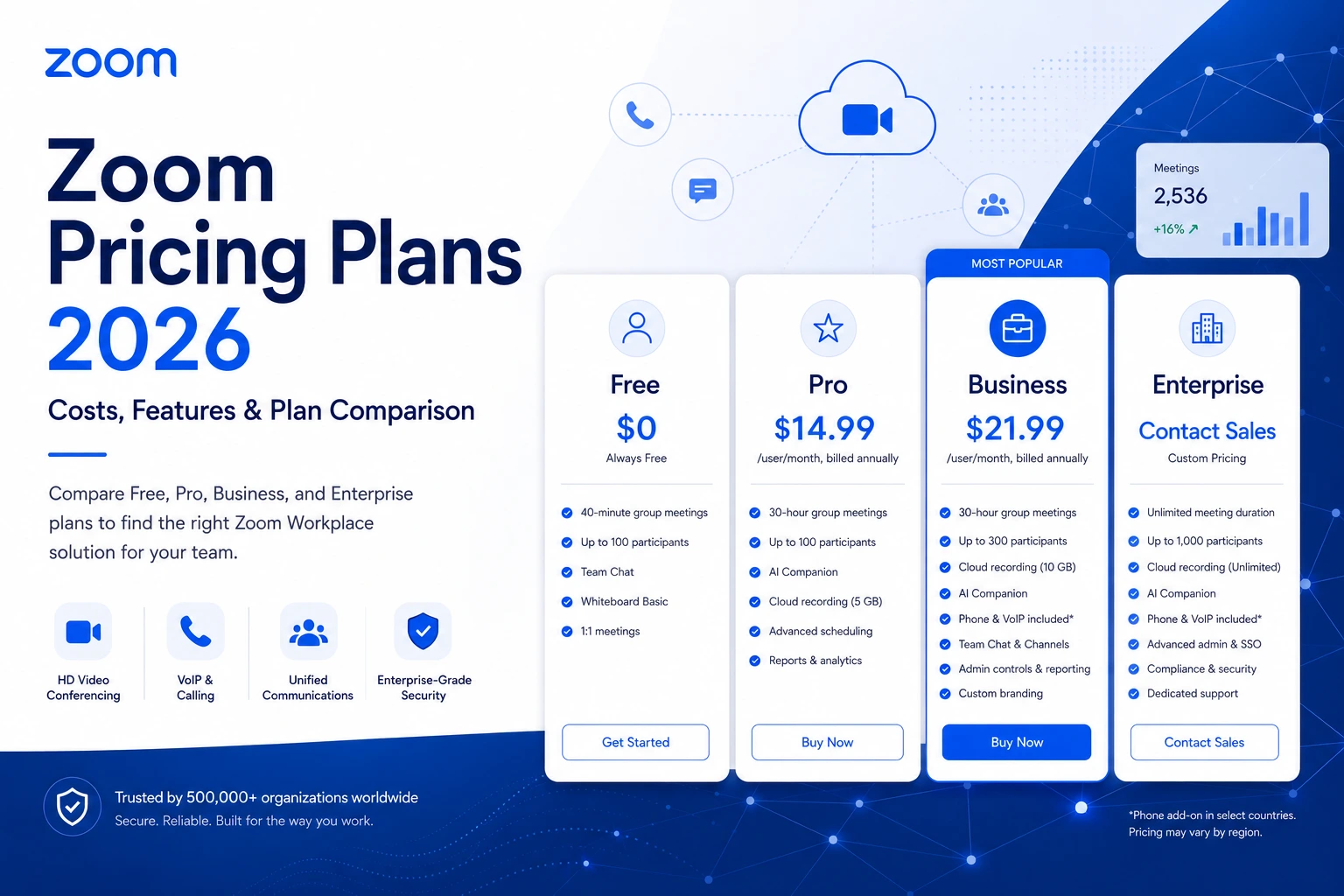
Zoom's four core plans cover most teams:
- Basic (Free): $0 — 100 participants, 40-minute group meeting cap
- Pro: $13.33/user/month (annual) — unlimited meeting length, AI Companion included
- Business: $18.33/user/month (annual) — 300 participants, admin controls, unlimited whiteboards
- Enterprise: Custom pricing — 1,000 participants, unlimited storage, dedicated support
Most organizations realistically land between $18–$25/user/month once they account for the add-ons they actually need — phone lines, larger webinar capacity, or additional cloud storage. This guide breaks down every tier, add-on, and cost driver so there are no surprises on your invoice.
Zoom Pricing Overview: How the Plans Are Structured
Zoom's pricing model is built around named-user (per-host) licensing. Every person who needs to host meetings, use AI Companion, or access cloud recording needs their own paid seat. Attendees who only join meetings can do so at no cost, which is important context when calculating your actual license count.
Plans are billed monthly or annually, with annual billing saving roughly 21% compared to monthly rates. The table below shows current published list prices:
Zoom Basic (Free Plan): What You Actually Get
Zoom's free plan is genuinely useful for occasional users, solopreneurs, and teams that primarily need one-on-one calls. It includes more than most people expect:
- Up to 100 participants per meeting
- Unlimited 1:1 meetings with no time restriction
- 40-minute cap on group meetings (3+ participants) — the most significant limitation
- Core collaboration tools: screen sharing, virtual backgrounds, breakout rooms, local recording
- Zoom Chat: persistent team messaging, unlimited history, file sharing
- Zoom Whiteboard Basic: three editable boards
- Zoom AI Companion: not included on the free plan
The 40-minute cap is a genuine pain point for business use. If a group call runs long — and they do — everyone gets cut off mid-conversation. For anything beyond casual use, the interruption alone justifies upgrading.
Best for: Personal use, quick external calls with no login required for guests, testing the platform before committing.
Zoom Pro: The Right Starting Point for Most Teams
Annual price: $13.33/user/month ($159.96/user/year) Monthly price: $16.99/user/month
Pro removes the 40-minute limit and introduces the tools that make Zoom actually useful for daily business operations.
What's Included in Zoom Pro
- 30-hour meeting duration — effectively removes the time cap
- 100 participants per meeting (same limit as free, but without interruptions)
- 5 GB cloud recording storage per user — save and share recordings via link
- Zoom AI Companion — meeting summaries, action item extraction, real-time transcription, whiteboard generation from meeting discussions — included at no extra charge
- Single Sign-On (SSO) support
- Custom Personal Meeting ID
- 24/7 live chat and phone support
- Zoom Clips for async video messaging
- Streaming to social media (YouTube, Facebook Live)
The AI Companion Advantage Worth Highlighting
Zoom AI Companion 3.0 is included with Pro at no added cost. This matters more than it might seem: comparable AI features cost $30/user/month extra for Microsoft Teams (Copilot add-on) and require Slack's higher-tier plan. For a 25-person team, that's up to $9,000/year in savings on AI capabilities alone.
Pro Plan Limitations to Know
Pro caps at 99 licenses per account — once you need 100+ seats, you must upgrade to Business. It also doesn't include SSO-managed domains, custom branding, or the admin controls that IT teams need for centralized license management.
Best for: Freelancers, consultants, small sales teams, and businesses with fewer than 100 hosts who need reliable, unlimited meetings with AI tools included.
Zoom Business: For Growing Teams That Need More Control
Annual price: $18.33/user/month ($219.96/user/year) Monthly price: $21.99/user/month Minimum licenses: 10 seats
The jump from Pro to Business primarily buys you two things: larger meetings and enterprise-grade administrative controls.
What Business Adds Over Pro
- 300 participants per meeting — accommodates company-wide all-hands, larger training sessions, and external demos
- Unlimited Zoom Whiteboards — Pro is capped at three boards; Business removes the limit entirely, making the visual collaboration tools fully usable for teams
- Single Sign-On (SSO) with managed domains — essential for centralized IT management and SAML-based authentication
- Custom branding: your company logo, colors, and custom meeting URL (e.g., yourcompany.zoom.us)
- Admin portal and dashboards: centralized management of all licenses, permissions, and usage analytics
- Expanded phone support and a dedicated service ticketing system
- Workspace Reservation for hybrid office scheduling
- Cloud recording: 5 GB per user (pooled to approximately 250 GB at the account level)
Who Actually Needs Business vs. Pro
The clearest triggers for upgrading from Pro to Business are:
- You need SSO — it's a Business-minimum feature, regardless of team size
- You regularly host meetings with 100+ people — company all-hands, large client calls, training
- Your IT team needs centralized control over permissions, recording policies, and branding
- You want unlimited Zoom Whiteboard access for visual collaboration without the 3-board cap
Best for: Mid-sized companies (10–249 users) running organized, policy-governed meetings. The standard choice for teams that have outgrown Pro's limits.
Zoom Business Plus: When You Need Phone Too
Annual price: $22.49/user/month Monthly price: $29.00/user/month Minimum licenses: 10 seats
Business Plus is a bundle: everything in Business, plus Zoom Phone with unlimited domestic calling in the US and Canada.
What Business Plus Adds Over Business
- Unlimited Zoom Phone calling (US and Canada domestic) — replaces a separate Zoom Phone subscription
- 10 GB cloud recording storage per user (doubled from Business's 5 GB)
- All other Business features unchanged
Is the Bundle Worth It?
A standalone Zoom Phone Unlimited plan typically costs $15–$20/user/month. If users who need Business-level meetings also need a cloud phone system, bundling them into Business Plus at $22.49/user/month usually saves money compared to buying both separately. For sales teams, support desks, or any organization replacing a traditional phone system alongside their video conferencing, Business Plus is the natural choice.
If only a subset of your team needs phone capabilities, it may be more economical to put those users on Business Plus and the rest on Business — rather than upgrading everyone.
Best for: Organizations running both cloud video meetings and VoIP phone services, particularly sales and support teams that need call-heavy workflows alongside full Zoom Meetings functionality.
Zoom Enterprise: Large Organizations, Custom Pricing
Enterprise is Zoom's fully negotiated, high-volume tier. There's no published price — you contact Zoom sales for a custom quote. The general threshold is 250+ licenses.
What Enterprise Includes
- Up to 1,000 participants per meeting (Enterprise+, also negotiated, can go higher)
- Unlimited cloud storage — no cap on recordings
- Dedicated Customer Success Manager (CSM) for onboarding, optimization, and ongoing support
- Executive business reviews included
- Advanced compliance tools: enhanced transcription, data governance, information protection
- Workspace Reservation for hybrid office management
- Volume discounts negotiated on a case-by-case basis
- Full Zoom Phone features bundled
Negotiation Levers Worth Knowing
Enterprise pricing isn't fixed — it's negotiated. According to buyer data from procurement platforms, organizations with 100+ users can often negotiate meaningful discounts, especially at contract renewal. One strategy that's not publicly advertised: ask about Active Host Model pricing, where billing is based on the number of users who actually host meetings rather than total seat count. Given that roughly half of Zoom licenses across enterprise deployments go unused, this can significantly reduce effective per-user cost.
Organizations on GSA Schedule contracts can access pre-negotiated government pricing through Zoom's authorized resellers.
Best for: Large enterprises (250+ users) needing maximum participant capacity, dedicated support, and custom compliance or security requirements.
Zoom Add-Ons: The Costs That Sneak Up on You
Add-ons are where Zoom's total cost can diverge significantly from the base plan price. Factor these in before finalizing your budget.
Zoom Phone (Standalone)
If you don't need the full Business Plus bundle, Zoom Phone is available as a standalone add-on:
Zoom Phone includes virtual numbers, call routing, voicemail transcription (via AI Companion), and integration with Zoom Meetings — calls can be escalated to video with one click.
Zoom Webinars
Webinars are a separate add-on that requires at least a Pro plan to purchase. They're designed for one-to-many broadcasts — think product launches, company all-hands, customer education events, and investor calls — where attendees are largely view-only.
Important pricing reality: Zoom Webinars start at $79/month as an add-on, but you also need a base Zoom Meetings plan (minimum Pro at $13.33/month). True minimum cost for webinar capability: approximately $92/month for 500 attendees.
Webinar features include: attendee registration pages, Q&A, polling, post-event analytics, and the ability to export attendee data. Note that Zoom Webinars are live-only — there's no automated or evergreen webinar functionality built in.
For events with fewer than 300 attendees, a Zoom Business plan meeting with registration enabled may be sufficient without the webinar add-on.
Zoom Rooms
Zoom Rooms turns a physical conference room into a one-tap Zoom-enabled meeting space. Pricing is per room, per month:
- Software license: $49–$99/room/month
- Hardware (cameras, displays, controllers): $1,500–$15,000+ per room, depending on room size and equipment quality
Hardware is a one-time capital cost; the software license is ongoing. Organizations with multiple offices or hybrid environments that need consistent in-room meeting experiences should budget both.
Large Meeting Add-On
Need more than 300 participants on a Business plan, or more than 100 on Pro, without going to Enterprise? The Large Meeting add-on raises participant caps:
- 500 participants: approximately $50/month per license
- 1,000 participants: approximately $90/month per license (or $600–$1,080/year)
This add-on is applied per host license, so only the hosts who actually run large meetings need it — not every seat in your account.
Custom AI Companion (Enterprise Add-On)
The standard Zoom AI Companion is included in all paid plans. The Custom AI Companion add-on, at approximately $12/user/month, provides organization-specific AI customization: custom knowledge bases, role-specific prompts, vertical-specific templates, and deep research mode across enterprise data sources.
A note on add-on stacking: a Pro user at $13.33/month who adds Custom AI Companion at $12/month is effectively paying $25.33/month — nearly doubling the base price. Always calculate total per-user cost including add-ons before comparing plans.
Zoom Events
For multi-session hybrid events (conferences, summits, expos), Zoom Events is a comprehensive virtual event platform. Pricing starts at approximately $415/month (annual) for the Events plan, scaling based on attendee capacity and features. This is a specialized product for organizations running large-scale events, not a replacement for standard webinars or meetings.
Real-World Cost Examples
Understanding list prices is one thing. Here's what organizations typically pay in practice, based on verified buyer data:
50-person startup on Pro (annual billing): 50 × $13.33 = $666.50/month → ~$7,998/year No add-ons needed for basic video conferencing. Pooled cloud storage of ~250 GB.
150-person mid-market company on Business (annual): 150 × $18.33 = $2,749.50/month → ~$32,994/year Covers SSO, 300-participant meetings, centralized admin. Phone and webinars not included.
300-person company on Business Plus (annual): 300 × $22.49 = $6,747/month → ~$80,964/year Includes phone system. No separate VoIP contract needed.
The median Zoom contract across 1,335 verified purchases is approximately $11,551/year — consistent with a company of 60–80 users on a Business or Pro plan with selective add-ons.
Monthly vs. Annual Billing: Is the Savings Worth the Commitment?
Annual billing saves approximately 21% over paying month-to-month. For a 50-person Pro team:
- Monthly billing: 50 × $16.99 = $849.50/month → $10,194/year
- Annual billing: 50 × $13.33 = $666.50/month → $7,998/year
- Annual savings: ~$2,196
The trade-off: annual contracts auto-renew, and some users report difficulty canceling even several weeks before the renewal date. If your team size is fluctuating, it may be worth paying the monthly premium for flexibility rather than locking into annual seats you may not need.
Practical tip: Start with monthly billing to validate usage patterns, then switch to annual at renewal once you have accurate seat count data.
The honest read: Zoom's base price is higher than Microsoft Teams or Google Workspace entry points. But those comparisons require context:
- Teams at $4/month (Essentials) doesn't include Office apps and becomes substantially more expensive once you need Microsoft 365 ($6–$12.50/month) plus Copilot AI ($30/month extra). The all-in AI cost for Teams is $36+/user/month vs. Zoom Pro's $13.33 with AI Companion already included.
- Google Workspace at $8.40/month bundles email, docs, Drive, and Meet together — useful if you need all of those. If you only need video conferencing, you're paying for tools you may not use.
- Webex starts cheaper at $12/month but reserves AI features for higher tiers, and its best-in-class security and compliance (FedRAMP, Zero Trust) are aimed at regulated industries.
For teams that need strong AI, Zoom's total cost of ownership compares favorably — especially against Teams once Copilot is factored in.
Discounts: Nonprofit, Education, and Government Pricing
Nonprofit Discount (Zoom Cares Program)
Zoom offers 50% off select products for eligible nonprofit organizations through its Zoom Cares program. Qualifying organizations must have an annual operating budget of $10 million or less. Eligible discounted products include Zoom Workplace Pro, Workplace Business, Webinars, and Large Meetings add-ons. Eligibility is verified through Goodstack, Zoom's third-party verification partner.
Note: education, healthcare, and government organizations are excluded from the Zoom Cares nonprofit program and have separate pricing pathways.
Education Pricing
Zoom offers specialized pricing for eligible educational institutions through Zoom Workplace for Education — a bundled package that includes Meetings, Team Chat, Whiteboard, and Translated Captions, designed for institutional deployment. Eligibility includes US and Canadian government-funded schools; private for-profit training centers are typically excluded. Pricing is FTE-based and available through Zoom's education sales team.
For smaller schools (20–250 students), entry-level education licenses start at approximately $10/license/month.
Government Pricing
Government agencies can access pre-negotiated Zoom pricing through GSA Schedule 70 contracts via Zoom's authorized resellers (including Carahsoft). This procurement path typically offers volume-based pricing without the need for independent negotiation.
How to Choose the Right Zoom Plan
Work through these questions in order:
1. How many hosts do you need? Count only the people who will host meetings or need cloud recording — not every attendee. This is the number of paid licenses you need.
2. How long are your meetings? If any group meetings regularly exceed 40 minutes, you need at least Pro. For most business teams, this alone justifies the upgrade from free.
3. How many participants do you regularly host?
- Under 100: Pro covers you
- 100–300: Business is the natural fit
- 300+: Business with Large Meeting add-on, or Enterprise
4. Do you need SSO or managed domains? If yes, you need Business minimum — regardless of team size. SSO is not available on Pro.
5. Do you need unlimited Zoom Whiteboards? Pro limits you to three boards. If visual collaboration is central to your workflow, Business unlocks unlimited boards.
6. Do you need a phone system too? If yes, compare Business Plus ($22.49/user/month bundled) against Business + standalone Zoom Phone ($18.33 + $15–20 = $33–38/user/month). Business Plus is almost always the better value.
7. Are you running webinars? If yes, factor in the Webinar add-on cost ($79+/month) on top of your base plan. For small events under 300 people, a Business plan meeting with registration enabled may be sufficient.
Tips for Managing Zoom Costs
Audit your seats regularly. Industry data suggests roughly 50% of Zoom licenses in enterprise accounts go unused. A quarterly audit — comparing license count to actual meeting hosts — frequently reveals significant cost savings.
Only buy host licenses. Attendees who join meetings but never host them don't need paid seats. Review your actual hosting patterns before purchasing.
Choose annual billing once stable. After validating usage for 1–3 months on monthly billing, switch to annual to capture the ~21% savings. Avoid annual commitments during team growth or restructuring phases when seat count is volatile.
Negotiate at renewal, not at purchase. Zoom's most flexible pricing typically comes at contract renewal, especially for accounts with 100+ users. Ask about Active Host Model pricing and volume discounts before signing a new annual contract.
Don't overbuy add-ons. Webinar licenses, Large Meeting add-ons, and Custom AI Companion are often purchased for entire teams when only a handful of hosts actually need them. Assign add-ons by role, not by default.