Quick Answer: Zoom Chat or Slack?
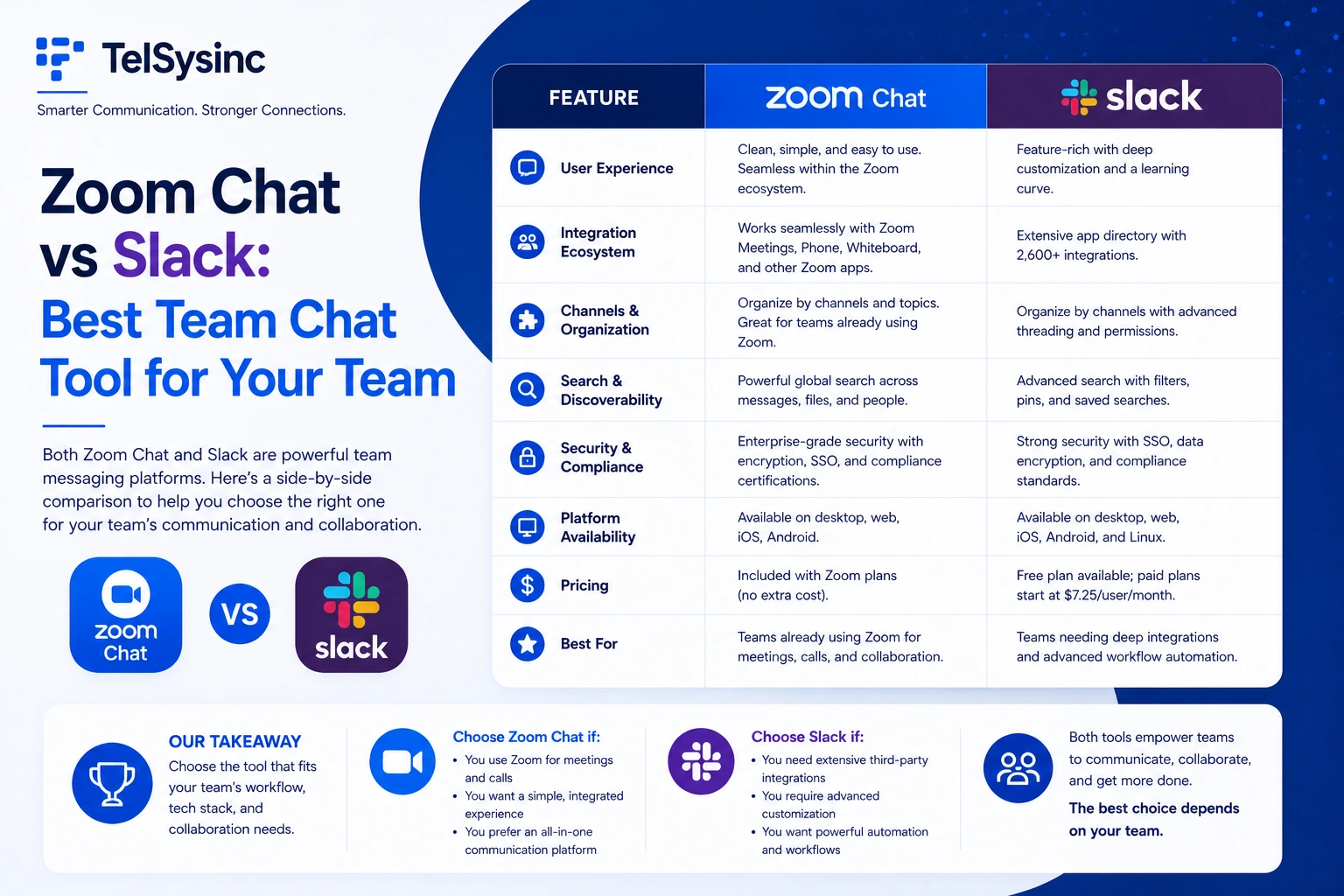
Choose Zoom Chat if your team already uses Zoom for meetings and wants a unified platform — chat, calls, whiteboard, and AI summaries all in one app, with no additional per-user messaging cost.
Choose Slack if messaging and integrations are the core of your workflow. Slack's mature channel system, 2,400+ app ecosystem, and now-built-in AI features make it the stronger dedicated communication hub — especially for technical, sales, or support teams living in dozens of tools at once.
Neither is a universal winner. The right call depends on where your team's work actually happens.
What's Changed in 2025: Why This Comparison Matters More Than Ever
Both platforms made significant moves this year that should change how you evaluate them.
Slack underwent its most consequential transformation since its Salesforce acquisition in 2021. In June 2025, Slack embedded AI features across all paid plans — including conversation summaries, huddle notes, thread recaps, translation, and workflow generation — while simultaneously raising Business+ pricing from $12.50 to $15/user/month. More significantly, Slack launched Agentforce: AI agents that can be deployed directly in Slack channels to handle deal routing, support ticket triage, customer briefs, and CRM-triggered workflows. Slack is no longer just a messaging app. It's becoming the front end of the Salesforce ecosystem.
Zoom launched AI Companion 3.0 in late 2025, adding agentic task execution across 16+ enterprise apps, daily reflection reports, and cross-platform AI summaries — all still included at no additional cost with paid Zoom Workplace plans.
Understanding these changes is essential before choosing between them in 2025.
Platform Overviews
What Is Zoom Chat?
Zoom Chat is the messaging layer built directly into Zoom Workplace — Zoom's unified communications platform that combines meetings, chat, phone (Zoom Phone), whiteboard, and AI in one environment. If your organization already pays for Zoom, you already have Zoom Chat. There's no separate contract, no additional per-user messaging fee, and no app to install alongside your meeting tool.
Key elements that make Zoom Chat distinct:
- Continuous Meeting Chat: Every Zoom meeting has its own persistent chat channel. Conversations before, during, and after the meeting all live in one thread — including the AI-generated summary after the call ends.
- Shared Spaces: Organizational folders that group related channels together for a project, automatically adding new team members to all relevant chats at once.
- Message scheduling: Send messages timed to a recipient's local time zone — a feature Slack doesn't offer natively.
- Zoom AI Companion: Summarizes long chat threads, extracts action items, suggests task creation, and helps schedule meetings by checking teammates' calendars — included free on paid plans.
What Is Slack?
Slack is a dedicated team communication platform, now owned by Salesforce, built around channel-based messaging. Since its 2013 launch, Slack has defined how modern teams organize conversations: channels by project, team, or topic; threaded replies to keep discussions clean; and integrations that bring data from other tools directly into the conversation.
In 2025, Slack has evolved significantly beyond messaging. Its most important new direction: embedding Salesforce's Agentforce AI directly into Slack channels. AI agents now handle tasks like routing support tickets, compiling customer briefs, and responding to CRM event triggers — automatically, inside your existing chat workflow.
Slack's enduring strengths remain its polish and depth: a mature interface refined over a decade, 2,400+ third-party integrations, Slack Connect for seamless cross-company collaboration, and a Workflow Builder that lets non-developers automate complex multi-step processes without writing a line of code.
Feature-by-Feature Comparison
Channels, Organization, and Navigation
Both platforms use channels to organize conversations. The experience differs in meaningful ways.
Slack's approach is clean and familiar. Channels appear in a vertical left sidebar, searchable and star-able. You can create sections to group channels, and Slack's search is industry-leading — fast, filtered, and capable of surfacing specific messages across years of history. Slack Connect allows external companies to share a dedicated channel with your team, making partner and vendor communication feel seamless rather than foreign.
Zoom Chat's approach adds structural layers. Shared Spaces are essentially folders of channels — useful for complex projects with multiple sub-teams. When someone joins a Shared Space, they're automatically added to all associated channels, eliminating the manual process of adding people one by one. The interface uses a horizontal tab bar rather than Slack's vertical sidebar, with color-coded categories and drag-and-drop tab reordering. Some users find this more organized; others find it takes more adjustment.
One notable difference: threaded replies in Zoom Chat work universally — in channels, DMs, and even in-meeting chats. Slack limits threading to channel conversations only.
For navigation and search: Slack has a decade's head start on refinement and it shows. For structural project organization: Zoom Chat's Shared Spaces offer something Slack doesn't match natively.
Messaging Features and Day-to-Day Usability
For the fundamentals — @mentions, file sharing, emoji reactions, message formatting, link previews — both platforms are mature and capable. The differences are in the details.
Zoom Chat advantages:
- Schedule messages to send at a specific time (especially valuable for distributed teams across time zones)
- Richer presence indicators: not just "online/offline" but "in a meeting," "heads down," or custom statuses
- Send the same message to multiple channels or DMs simultaneously — useful for announcements that don't belong in a single channel
- Annotate images directly in chat before sharing
- Decline incoming calls with an automated redirect to chat — preserving focus without leaving someone hanging
Slack advantages:
- More mature threading and in-thread formatting
- More granular message notification controls
- Slack Canvases: rich collaborative documents embedded inside channels, useful for persistent team wikis and running notes
- Built-in to-do lists and project task templates
For most users, Slack's chat experience feels more polished and familiar. Zoom Chat's unique features — message scheduling, multi-recipient sends, richer presence — are genuinely useful but require adjustment if your team is coming from a Slack background.
Audio and Video Calls
This is where the platforms diverge most sharply, and it's not close.
Slack Huddles are lightweight audio-first calls you can drop into from any channel or DM. They're quick and casual — designed for fast check-ins, not structured meetings. Video is available on paid plans, but Huddle capacity is limited (up to 50 on paid tiers), and Slack's video infrastructure isn't built for the kind of scale or quality that Zoom provides. Clips — Slack's async video messaging feature — are useful for leaving screen recordings or short video updates.
Zoom Meetings are world-class. Zoom built its reputation on video call quality and has never stopped investing in it. Launching a Zoom meeting from within a Zoom Chat channel takes one click. Every meeting automatically creates a continuous chat thread, and after the meeting ends, Zoom AI drops a summary and action items directly into that thread.
For teams that need reliable, high-quality video as a core part of their workflow, the difference isn't marginal — Zoom is in a different league. Many organizations actually install both platforms: Slack for day-to-day messaging, Zoom for video calls. There's an official Zoom integration for Slack that enables this, letting you type /zoom in any Slack channel to launch a Zoom meeting instantly.
For video and audio calls: Zoom wins, and it's not a close comparison.
AI Features: Zoom AI Companion 3.0 vs Slack Agentforce
AI is now the most strategically important differentiator between these platforms, and both have made major 2025 updates.
Zoom AI Companion 3.0
Included at no additional cost with all paid Zoom Workplace plans. Key capabilities in chat contexts:
- Summarizes long channel threads or document links on demand
- Extracts action items and suggested next steps from conversations
- Helps schedule meetings by checking teammates' calendars without leaving chat
- Generates meeting agendas and follow-ups automatically
- Agentic task execution: connects to 16+ enterprise apps (ServiceNow, Asana, and more) to complete tasks without manual steps
- Daily reflection reports delivered automatically
The "no extra cost" point matters more than it might seem. For a 50-person team, Zoom AI Companion costs zero extra. Slack's comparable AI features are now built into Business+ — but that plan just increased to $15/user/month, and the most powerful Agentforce AI agents cost $125/user/month as an add-on.
Slack's AI and Agentforce
Slack's 2025 AI update was significant. Starting with Business+ plans, Slack now includes:
- Conversation and thread summaries
- Huddle notes (automatic transcripts from audio calls)
- AI-powered recaps and search
- Workflow generation from natural language
- Translation within channels
More ambitiously, Agentforce AI agents can now be deployed directly in Slack channels. A lead status change in Salesforce can trigger a Slack message, route a specialist into a channel, and auto-create follow-up tasks — all without human intervention. For sales teams, support organizations, and any company running Salesforce as their CRM, this is genuinely transformative.
The Salesforce integration angle is Slack's clearest competitive advantage over Zoom Chat. If your team lives inside Salesforce — managing deals, service tickets, and customer relationships — Slack's AI pipeline is deeply useful in a way Zoom Chat simply can't replicate.
AI value for the money: Zoom AI Companion wins on cost (included free). Slack's Agentforce wins on depth for Salesforce-heavy organizations.
Slack's integration depth is the largest in the industry. Its 2,400+ app connections — spanning project management, DevOps, CRM, HR, and hundreds of niche tools — mean that most software your team uses probably already has a Slack integration. Workflow Builder lets non-technical users automate multi-step processes without any code.
Zoom's integration marketplace is smaller but focused. Its automation strength is in the meeting/chat pipeline: posting calendar events into channels, triggering AI summaries, and coordinating between Zoom Phone, meetings, and chat. Zoom Workflow Automation supports conditional logic and multi-step flows within the Zoom ecosystem.
For teams with specialized toolchains — engineering teams using GitHub and Jira, sales teams using niche CRMs, support teams using Zendesk or Intercom — Slack almost certainly has the integration. Zoom may not.
Integrations winner: Slack, by a significant margin.
Security and Compliance
Both platforms are enterprise-grade. Here's where they differ:
Slack:
- Encryption at rest and in transit
- SAML SSO, MFA, and granular device management on paid plans
- Enterprise Key Management (EKM) for customers who need control over their own encryption keys
- SOC 2 Type II, SOC 3, ISO 27001, HIPAA, GDPR compliance certifications
- AI features run on Slack's own infrastructure — your data doesn't leave the platform
- New in 2025: enhanced security features now extended to Pro and Free plans
Zoom Chat:
- End-to-end encryption for both messages and calls (strengthened in 2025)
- SAML/OAuth SSO and two-factor authentication
- Role-based permissions and admin controls over guest access
- Updated security dashboard with granular access management
- HIPAA-compliant configurations available
- Data retention and compliance export options
For highly regulated industries requiring extensive compliance certifications, Slack's portfolio is broader. For organizations prioritizing E2EE across meetings and chat, Zoom's combined platform offers that encryption across both channels.
The free plan comparison significantly favors Zoom Chat on message history. Slack's free tier, even with its recent update extending history to one year, archives older messages rather than making them fully searchable. Zoom Chat keeps history indefinitely on free accounts. For a small team that needs a permanent chat record without paying for it, Zoom Chat's free tier is more capable.
The cost framing that matters: Slack Pro ($7.25/user/mo) gives you great messaging but requires Business+ ($15/user/mo) for advanced AI. Zoom Pro (~$14.16/user/mo) includes AI Companion with meeting summaries, chat AI, and agentic capabilities at no extra charge. If you need both messaging and video meetings — and AI tools — Zoom's bundled pricing often works out more economical at the paid tier.
Pros and Cons
Zoom Chat
Strengths:
- Included in all Zoom accounts — no separate subscription required
- Unlimited chat history even on the free plan
- AI Companion built in at no extra cost on paid plans: thread summaries, action items, meeting prep
- Seamless launch of Zoom meetings from chat (and Continuous Meeting Chat threads)
- Message scheduling, multi-recipient sends, image annotation — features Slack lacks natively
- Superior presence indicators (meeting status, heads-down mode, custom states)
Weaknesses:
- Smaller integration ecosystem compared to Slack's 2,400+ apps
- Chat features and interface are less mature than Slack's decade-refined experience
- Primarily perceived as a meeting tool — team adoption for chat-first workflows can take adjustment
- Per-host pricing model means costs scale differently than per-user chat tools
Slack
Strengths:
- Best-in-class team messaging: threading, search, reactions, formatting all polished to a high standard
- 2,400+ third-party app integrations covering nearly every business tool
- Agentforce AI agents deeply integrated with Salesforce for sales and service workflows
- Slack Connect makes external collaboration with partners and clients seamless
- Workflow Builder for no-code automation of complex multi-step processes
- AI features now included in all paid plans (conversation summaries, recaps, translation, huddle notes)
Weaknesses:
- Business+ price increased to $15/user/month in 2025 (up ~20%)
- Free plan limits message history to 90 days (recently extended to 1 year, but still archived past that)
- Video calls (Huddles) are lightweight — not a substitute for Zoom's meeting quality
- Advanced Agentforce AI agents are expensive ($125+/user/month as an add-on)
- Full value requires Salesforce ecosystem — less compelling for non-Salesforce organizations
Who Should Use Which Platform?
Choose Zoom Chat if you:
- Already pay for Zoom and want to consolidate messaging and meetings into one platform
- Run a video-centric workflow where moving between chat and calls needs to be instant
- Want AI summaries, action items, and agentic features included without a separate license
- Need unlimited message history on a free or low-cost plan
- Manage hybrid teams that regularly move between async chat and live meetings
- Value message scheduling and advanced presence indicators for distributed teams
Choose Slack if you:
- Run a development, engineering, or technical team that relies heavily on GitHub, Jira, or Asana integrations
- Operate a sales or customer support organization that runs on Salesforce — Agentforce integration is a genuine workflow transformation
- Need deep, mature chat features and the most polished messaging interface available
- Collaborate frequently with external partners and clients (Slack Connect is best-in-class)
- Have complex automation needs best served by Workflow Builder and 2,400+ integrations
- Want a chat-first tool and are comfortable using Zoom (via integration) for video calls separately