
Zoom Canvas vs Zoom Docs (2026): what changed, what didn't, and how it compares to alternatives
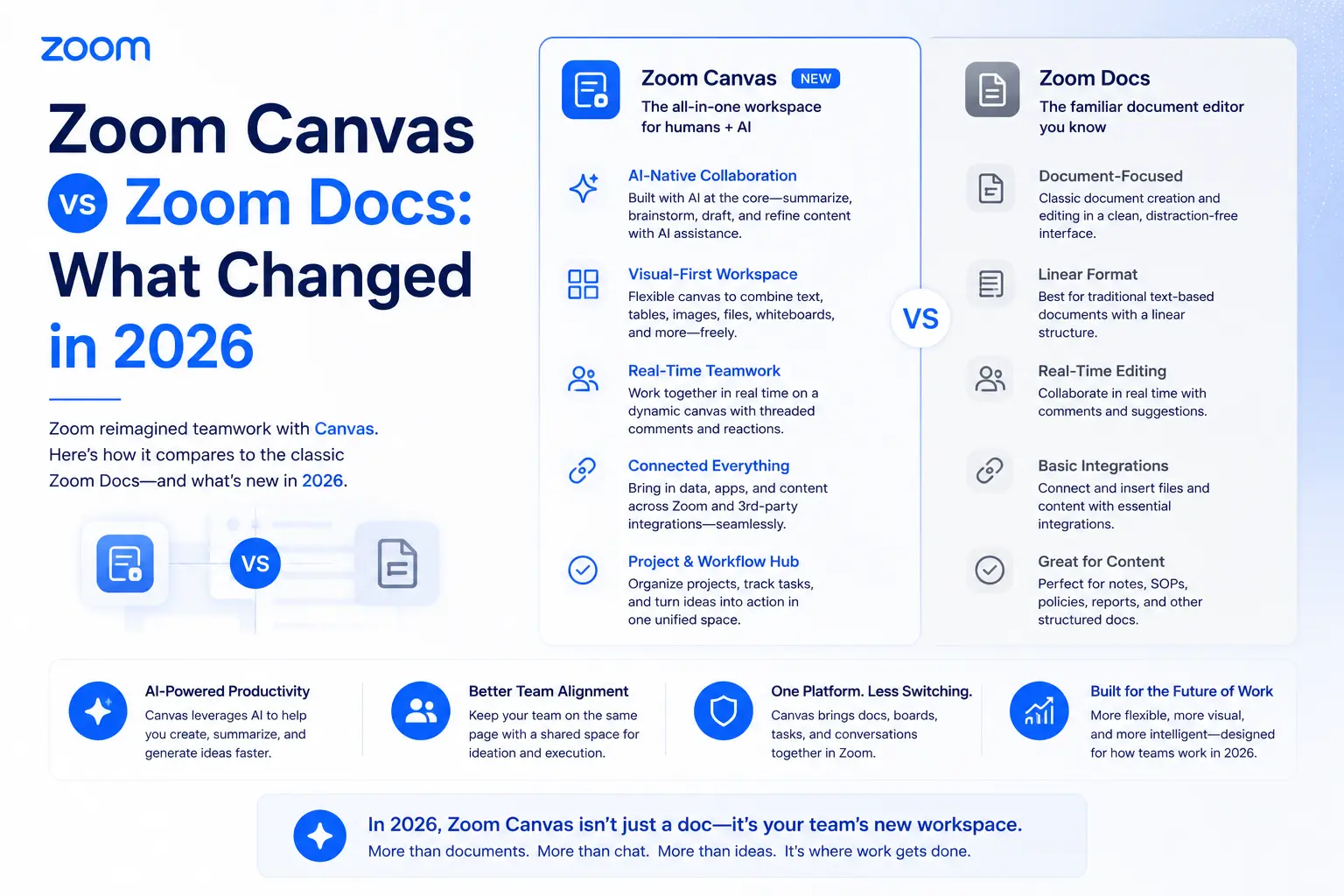
If you've been searching for "Zoom Docs" and landing on pages that say "Zoom Canvas," you're not confused — the product was renamed. Zoom Docs became Zoom Canvas in May 2026. Same features, same files, same pricing, different name on the tab.
But there's more to the story than a rebrand. The original Zoom Docs was a solid but underestimated tool when it launched in 2023. By 2026, with the addition of deeper AI integration, the full AI Productivity Suite launch, and competition from Notion AI, Coda, Microsoft Loop, and Google Workspace AI, Zoom Canvas is a more capable product competing in a much more crowded market. This guide covers the renaming in full — and fills in what the official announcement left out.
The short answer
Zoom Docs was officially renamed Zoom Canvas on May 18, 2026. No features were removed, no files were migrated, and no pricing changed. All existing Zoom Docs appear as Zoom Canvas documents. The renaming reflects a broader positioning shift — Canvas is now one of four tools in the Zoom AI Productivity Suite alongside Slides, Sheets, and Paper.
What was Zoom Docs?
Zoom Docs launched in October 2023 as Zoom's built-in collaborative workspace. At the time, it filled a genuine gap: Zoom was excellent for meetings but had no native place to capture and act on what happened in them. Docs changed that. It was built as a modular, block-based workspace — closer to Notion than Google Docs — where teams could create living documents, wikis, project trackers, and meeting summaries without leaving the Zoom environment.
The standout feature at launch was the meeting integration. During or after a Zoom call, Docs could pull in AI-generated meeting summaries, action items, and participant notes directly into a document — eliminating the manual "copy from meeting recap, paste into project doc" workflow that most teams still relied on. Real-time co-editing, @mentions, tasks, and embedded tables made it a credible alternative to dedicated note-taking tools for teams already in Zoom daily.
On the free Zoom Workplace Basic plan, users got up to 10 collaborative Docs. Paid Workplace plans included unlimited Docs and full AI generation features.
What is Zoom Canvas?
Zoom Canvas is the current name for the same product, updated and repositioned as part of Zoom's 2026 AI platform push. Functionally it's Zoom Docs with a new name and a clearer place in the product hierarchy — one of four tools in the AI Productivity Suite (alongside Zoom Slides, Zoom Sheets, and Zoom Paper).
The product still does everything Zoom Docs did: block-based document creation, real-time co-editing, AI-generated content from meeting transcripts, wikis, tables, checklists, and project trackers. The meeting integration remains the core differentiator. What's changed is the surrounding context: Canvas is now explicitly positioned as the flexible, free-form workspace within a broader suite of AI content tools, which makes the naming more coherent — Canvas for open-ended collaboration, Paper for formatted documents, Slides for presentations, Sheets for data.
The official renaming: full timeline
Why Zoom changed the name
The word "Docs" had two problems. First, it's generic — every major productivity platform has a "Docs" product, which makes it nearly impossible to search for or talk about in a crowded market. Second, it undersells what the product actually is. Zoom Docs wasn't just a word processor; it was a flexible, block-based workspace for any type of structured content. "Canvas" better captures that openness — an empty surface where you can build whatever structure the work requires.
The rename also serves a product architecture purpose. With the 2026 launch of the broader AI Productivity Suite, Zoom needed each tool name to clearly signal its function: Paper for polished, formatted documents; Slides for presentations; Sheets for data; Canvas for everything open-ended and collaborative. "Docs" would have implied a direct overlap with Paper. "Canvas" makes the distinction obvious.
There's also a competitive positioning element. Notion, Coda, and Microsoft Loop all use flexible workspace terminology. "Canvas" aligns Zoom with that category of tools rather than positioning it as a plain document editor.
Full feature breakdown: what Canvas can do
What's still not available in Canvas (notable gaps)
- No offline editing — Canvas requires an internet connection and the Zoom app or web browser
- No export to .docx or .pptx directly from Canvas — for formatted document exports, Zoom Paper (not Canvas) is the right tool
- No public-facing publishing — Canvas docs can't be shared as a public URL outside of Zoom without the recipient having a Zoom account
- Limited database/relational views — tables are supported, but Canvas doesn't yet have Notion-style relational databases or linked property fields
- No native integration with external document platforms (Google Drive, SharePoint) without going through ZoomMate connectors
Impact on existing Zoom Docs users
Minimal. All existing documents are preserved and accessible as Canvas docs. The URL structure (docs.zoom.us) continues to work. The tab in the Zoom app now reads "Canvas" instead of "Docs." Permissions, sharing settings, and content are unchanged. If your team has internal documentation, training materials, or help guides that reference "Zoom Docs," they'll need updating — but it's terminology only.
Free-tier limits remain the same: up to 10 collaborative Canvas docs on Zoom Workplace Basic. Paid Workplace plans include unlimited Canvas docs. Full AI generation (drafting from prompts, AI meeting summaries into docs, AI rewrites) requires either the AI Productivity Suite add-on ($10/user/month) or ZoomMate ($20/user/month), which is unchanged from when it was Zoom Docs.
How Zoom Canvas compares to competitors
This is what the official rename announcement didn't cover. Canvas now competes directly with tools that many teams already use — and understanding where it wins and loses matters more than understanding the rebrand itself.
The honest competitive assessment
Zoom Canvas's single strongest differentiator — the one no competitor matches out of the box — is the direct meeting integration. When a Zoom call ends, Canvas is the only workspace that receives AI-generated meeting content natively, without a third-party integration, copy-paste, or manual export. For teams that run their business in Zoom, that frictionless handoff from meeting to document is genuinely valuable.
Where Canvas falls short relative to Notion and Coda is structural depth. It doesn't have relational databases, linked property fields, or formula-driven views. Teams that have grown accustomed to Notion's interconnected pages and database views will find Canvas's block structure capable but less powerful. Microsoft Loop has a similar meeting-to-document concept but is scoped exclusively to Teams users and the Microsoft 365 ecosystem.
The practical decision tree: if your team lives in Zoom and wants a simple, AI-assisted workspace for meeting follow-up, Canvas is the lowest-friction option and effectively free at the Basic tier. If your team needs a full knowledge management system with relational data and cross-platform integrations, Notion or Confluence will serve better — but they don't know what was decided in your last Zoom call.
Who should use Zoom Canvas
- Teams that already use Zoom as their primary collaboration platform and want meeting outputs to flow directly into working documents
- Small to mid-sized teams looking for a free or low-cost collaborative workspace without adding another tool to the stack
- Teams subscribed to ZoomMate or the AI Productivity Suite who want the full suite of AI content tools working together
- Organizations that value keeping meeting context and document content in the same environment for traceability
Who should consider alternatives
- Teams that need relational databases, board views, or linked properties → Notion or Coda
- Engineering and product teams that need deep Jira integration and mature wiki structure → Confluence
- Organizations running entirely on Microsoft 365 → Microsoft Loop
- Teams that run meetings in Google Meet and use Google Workspace → Google Docs + Gemini